




4.7
Free
CapCut
Free all-in-one video editor for everyone

View an ad to download for free
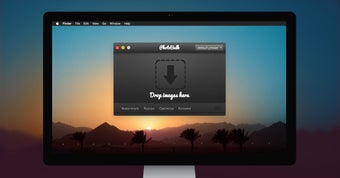
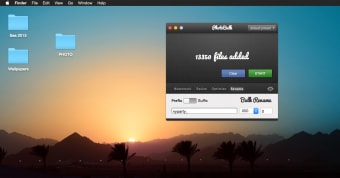
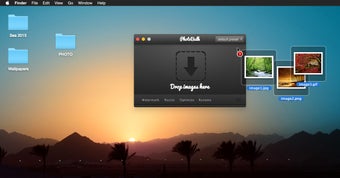
PhotoBulk is easy-to-use bulk image editor that lets you add text/image watermark, resize, and optimize hundreds and thousands of images or photos in just one click. You can also Rename multiple pictures and Convert to the most popular formats in no time. Just drag and drop your images onto the app, choose desired actions and press “Start”. Voila!
Bulk Watermark Options
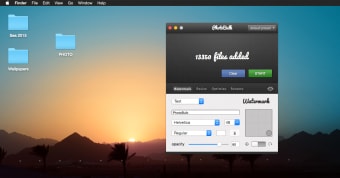
Bulk watermark lets you easily and quickly watermark multiple photos, using the great variety of options. Customize your photos with tags, logos or any other personal marks. Place watermark anywhere with the precise per-pixel controller, then switch to the angle mode and rotate it to that very angle you want and check the result immediately in real-time preview window!
Pick one of these amazing watermark features:
- Text Watermark;
- Image Watermark;
- Script Watermark (fill your photo with text tags);
- Datestamp.
Bulk Resize
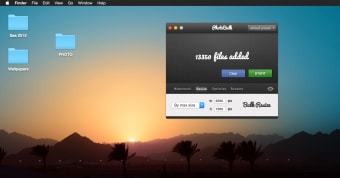
Resize hundreds of your photos in no time. Remember: reducing image dimensions will make the file size smaller. Use the variety of resizing options:
- by width and height;
- Percentage;
- By max size;
- Free size.
JPEG & PNG Optimization
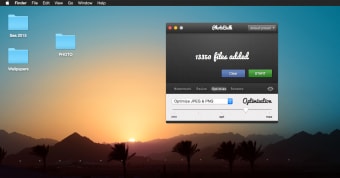
Optimize file size of your JPEG or PNG images while keeping their original resolution, quality, and format. Use it to save your disk space or to share them faster over Internet. Please note that PNG optimization is time-consuming and works slower than JPEG optimization.
Bulk Rename
Forget about those weird camera names, rename photos by giving a new filename and number sequences. You can also vary starting digit and number of zeros.
Bulk Conversion
Convert hundreds of photos for your convenience and easy sharing. Save all your images in desired format without any troubles. Bulk image conversion works with the most popular formats, like JPEG, PNG, GIF, BMP, TIFF.
Easy settings
Save your favorite and most used settings to presets for even faster bulk editing.
Real-Time Preview
Check how your files will look like before they are processed. Experiment with watermarks and sizes to achieve the desired results.
Supported Formats
JPEG, PNG, GIF, BMP, TIFF

Download and save videos to your computer with Video Downloader

A free app for Mac, by easyphotostudio-com.

iWatermark: Essential Tool for Photographers
Trial version
Mac
Mac OS X
English
16K
View an ad to download for free
Have you tried PhotoBulk? Be the first to leave your opinion!
Add review
A Top-Quality Graphic Design Software that’s Free

Precision design that scales with your creative vision
Free all-in-one video editor for everyone
Create stunning cinematic presentations on your Mac

An industry-leading software that turns designs into reality
A Top-Quality Graphic Design Software that’s Free
Free all-in-one video editor for everyone
Precision design that scales with your creative vision
An industry-leading software that turns designs into reality

Enhance your photos to perfection
Free
Free all-in-one video editor for everyone
Free
A Top-Quality Graphic Design Software that’s Free
Trial version
Precision design that scales with your creative vision
Trial version
An industry-leading software that turns designs into reality
Trial version
Enhance your photos to perfection
Download and save videos to your computer with Video Downloader
A free app for Mac, by easyphotostudio-com.
iWatermark: Essential Tool for Photographers

Resize, watermark, frame

Efficient Raw Photo Management for Mac Users

A free program for Mac, by mac-data-recovery.

ImageOptim: Efficient Image Compression for Mac

Efficient Image Resizing Tool for Mac

Easy-to-use drawing application

A free program for mac

Explore Creative Designs with Structure Synth

A free program for mac

A free program for mac

3D real time animation software

A free and useful image editor





